
AV Tools2.1.0 - App Store
You'll be able to see results in few seconds.
Publisher Description
Be an audio-visual pro wherever you go with AV Tools.
A simple but very useful collection of audio-visual tools and information for use when ever you need.
Additional features in AV Tools:
No Adverts
Tone Generator
DMX Address - Dip Switch Calculator
Aspect Ratio Calculator
Voltage Drop Calculator
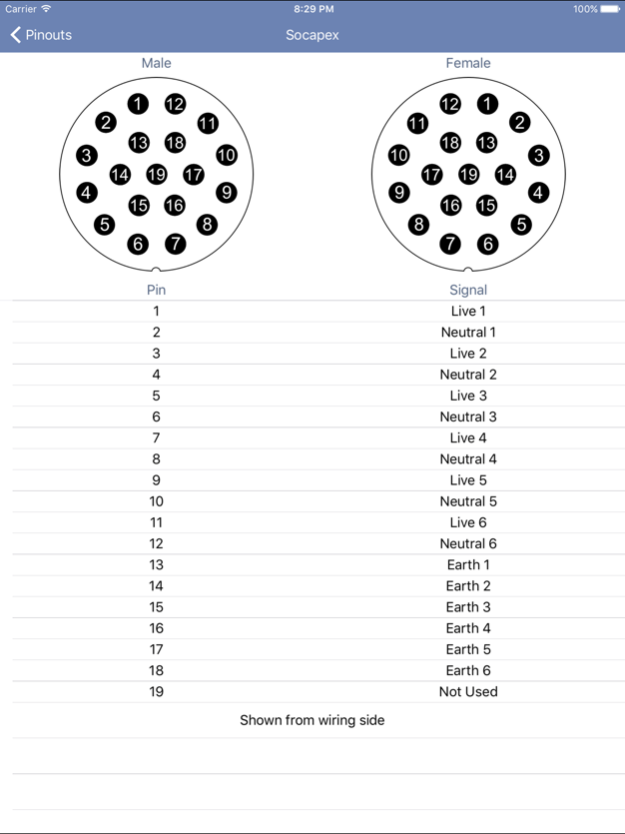
More pinouts: Cresnet, Tec Pro, RS232, Lectriflex/Harting, Socapex and VGA.
Audio Tools
Delay calculator - A quick and easy way to convert from metres / feet to mS.
DAW disk space calculator - Want to know how many tracks you can record for your 30 minute master piece and at what sample / bit rate based on your hard drive capacity, then this is the tool for you.
SPL calculator - Simply enter amplifier power, loud-speaker sensitivity and a distance to find your maximum sound pressure level.
Impedance calculators - Calculate total loads for a group of speakers in parallel and series configurations.
Tone Generator - Select from 10 common sine wave frequencies, 20hz to 20khz sine wave sweep, pink and white noise.
dBu / dBV to voltage converter, wavelength calculator, constant voltage impedance converter (70v + 100v line), and UK radio mic frequency lists (Ch38, Ch69 and de-reg).
Video Tools
Aspect ratio calculator - Need to work out a videos aspect ratio; simply enter the dimensions and press calculate, alternatively enter one dimension and select the aspect ratio to get the second dimension.
Projection distance calculator and screen resolutions guide.
Lighting Tools
DMX address - dip switch - Simply enter the DMX address to receive the correct dip switch settings, then select an offset (Number of DMX channels your fixture requires) and use the plus and minus buttons to quickly address multiple fixtures.
Beam width calculator and Gel cuts calculator.
Power Tools
Power voltage current calculator - A simple Ohm's law based calculator.
Voltage drop calculator
Plus
Pin-outs for common audio-visual connectors
AV Tools Reviews
5 Stars - "Great Audio Tools"
5 Stars - "Wao! Just what I needed. I love it! Thanks!"
4 Stars - "Good information. Nice update for Celsius and Fahrenheit. Thank you."
Dec 29, 2017
Version 2.1.0
This app has been updated by Apple to display the Apple Watch app icon.
Update for IOS 11 and iPhone X
About AV Tools
The company that develops AV Tools is Embu. The latest version released by its developer is 2.1.0.
To install AV Tools on your iOS device, just click the green Continue To App button above to start the installation process. The app is listed on our website since 2017-12-29 and was downloaded 0 times. We have already checked if the download link is safe, however for your own protection we recommend that you scan the downloaded app with your antivirus. Your antivirus may detect the AV Tools as malware if the download link is broken.
How to install AV Tools on your iOS device:
- Click on the Continue To App button on our website. This will redirect you to the App Store.
- Once the AV Tools is shown in the iTunes listing of your iOS device, you can start its download and installation. Tap on the GET button to the right of the app to start downloading it.
- If you are not logged-in the iOS appstore app, you'll be prompted for your your Apple ID and/or password.
- After AV Tools is downloaded, you'll see an INSTALL button to the right. Tap on it to start the actual installation of the iOS app.
- Once installation is finished you can tap on the OPEN button to start it. Its icon will also be added to your device home screen.
Program Details
System requirements
Download information
Pricing
Version History
version 2.1.0
posted on 2017-12-29
Dec 29, 2017 Version 2.1.0
This app has been updated by Apple to display the Apple Watch app icon.
Update for IOS 11 and iPhone X
version 2.1.0
posted on 2017-12-29
Dec 29, 2017 Version 2.1.0
This app has been updated by Apple to use the latest Apple signing certificate.
Update for IOS 11 and iPhone X
version 2.1.0
posted on 2017-12-29
Dec 29, 2017 Version 2.1.0
Update for IOS 11 and iPhone X
version 2.1.0
posted on 2017-12-29
29. dec 2017 Version 2.1.0
This app has been updated by Apple to use the latest Apple signing certificate.
Update for IOS 11 and iPhone X
version 2.0.0
posted on 2012-02-02
version 2.1.0
posted on 1970-01-01
2017年12月29日 Version 2.1.0
Update for IOS 11 and iPhone X
Disclaimer
Official App Store Link
We do not host AV Tools on our servers. We did not scan it for viruses, adware, spyware or other type of malware. This app is hosted by Apple and passed their terms and conditions to be listed there. We recommend caution when installing it.
The App Store link for AV Tools is provided to you by apps112.com without any warranties, representations or guarantees of any kind, so access it at your own risk.
If you have questions regarding this particular app contact the publisher directly. For questions about the functionalities of apps112.com contact us.
